Communications & Control Hub

A glass helm is more than just a modern replacement for gauges and toggle switches. It gives the captain a single source of truth for the operational state of the vessel. Information is selected, cross referenced and displayed to provide quick and easy situational awareness and control.
The helm may be digital, but the vessel still depends on pumps, lights, engines, valves, sensors, and other real-world equipment. One or more HL-MPIC-001 units form the backbone of the I/O layer behind the glass helm. They provide the I/O that enables NAUTIHELM software to see what is happening aboard and control the equipment that matters. The HL-MPIC-001 supports manual, automatic, and autonomic control actions.
The HL-MPIC-001 is the hub of the HELMLOGIX system. Add sensor nodes for the features your boat needs, plug them into the same PoE switch, and the hub finds them and sets them up.
With intelligent plug and play peripherals like the HL-MPIC-001, the simplification and modernization extends beyond the touch screen. There is less marine-grade copper to buy and you spend less time pulling and securing wire. The result is a simpler installation belowdecks and better diagnostics when something goes wrong; the system can identify the circuit or device involved instead of sending you into the boat to chase a wire.
One Touch Screen Monitor Replaces a Sea of Switches
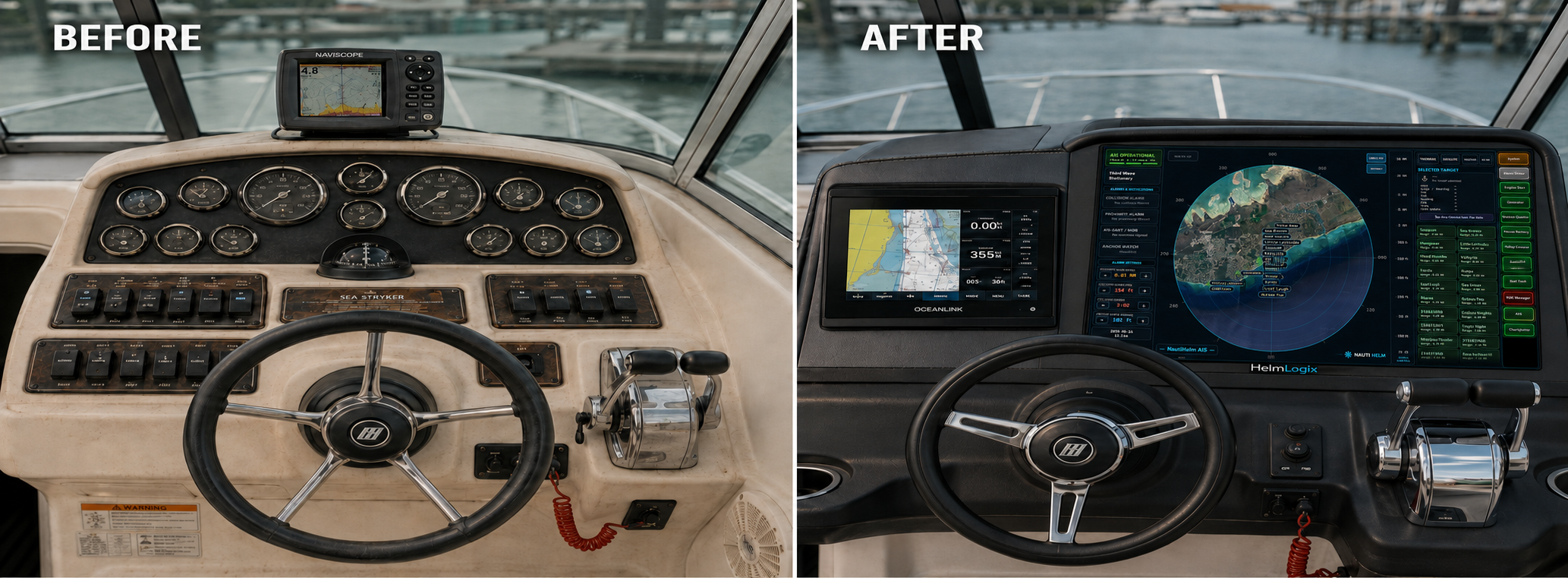
Left, a working dash from the 1990s: a wall of rocker switches and breakers along with a bank of analog gauges — every one exposed to brutal UV and moist salt air, each requiring its own copper run to loads and sensors. Right, the same helm rebuilt around a NAUTIHELM enabled touch screen backed up by one or more HL-MPIC-001 nodes. The gauges become intelligent readouts, the switch bank becomes touchscreen buttons, and the switching and sensing moves off the console and out to I/O nodes near their targets.
The Copper Math
A PoE node doesn't just modernize the wiring — it changes the arithmetic. You avoid long runs of expensive marine grade tinned copper wire across the length of the vessel by replacing it with data transmitted to the MPIC over low cost outdoor/direct burial grade Ethernet cable.
Traditional. Heavy copper from the panel to a helm switch and back out to every load — long runs, both directions, the full length of the boat.
HELMLOGIX. The I/O node(s) sit(s) by the loads. Copper is only a short stub to each device; one Ethernet cable provides both a data link and PoE power to the I/O node.
The Node
The HL-MPIC-001 is a smart, Plug and Play, PoE-powered marine I/O controller: eight relay outputs rated 10 A @ 30 VDC, eight Analog-Digital Inputs that measure 0–36 VDC and turn each reading into on or off at a trip point you set, and enough on-board intelligence to keep critical loads safe when the network isn't there. It speaks MQTT to NAUTIHELM and runs its safety logic locally, on the device.
Local Safety That Survives a Dead Network
Power-on defaults, comms-loss failsafes and directional interlock run on the device. If the broker, switch or cable fails, channels fail to their safe state without waiting on the network.
Physical Switches That Keep Working Offline
Tie an input straight to a relay output with a local rule — a float switch forces a bilge pump on, a limit switch stops a windlass. The rule lives in the HL-MPIC-001 and keeps working with the broker down.
Authenticated Control
Once configured, the node acts only on cryptographically signed commands keyed to its MAC address. Unsigned, malformed, forged, altered or replayed commands are rejected — other controllers on the LAN can't drive it.
Inputs That Count, Not Just Sense
Any input can be set to count pulses, up to about 100 a second, at the trip point you set. The same terminals that read a float or limit switch also read fuel and water flow, shaft RPM or paddlewheel speed, and publish the live rate to NAUTIHELM.
See What's Driving Every Output
Each channel reports not just on or off, but why — operator command, a local rule, or a frozen block. When a float switch overrides your command, the helm shows the relay on and the rule as the reason.
Reversing Loads Done Right
Group two channels as a directional pair (H-bridge) for a windlass, trim tab or bait-tank pump. Both directions are never driven together, and dead-time through STOP is inserted on every reversal.
Ethernet Control & Monitoring
Remote control and monitoring of all I/O over Ethernet — eight sealed relays rated 10 A @ 30 VDC and eight Analog-Digital Inputs, all on one cable.
Plug+Play Deployment
One PoE cable per node brings the MPIC online. DHCP assigns the Ethernet address, NAUTIHELM software assists the node in finding the broker and then reads the node's capabilities via a proprietary PnP protocol. After discovery and inventory, the MPIC appears in NAUTIHELM's IO mananger ready to configure. Once configured, the MPIC boot is automatic. A multicolor boot LED and locate buzzer help you find it during installation.
Stateful Power Resumption
Per-channel power-on behavior: Off, On or Restore Last. Restore brings the HL-MPIC-001 back to its last saved state after a power cycle.
-----------
Over-the-air firmware updates travel the same Ethernet link. A failed update rolls back automatically, so the HL-MPIC-001 always boots.
Start Here — Out of the Box
Four steps, about five minutes. You never need to know the controller's network address.
Give it power and a network
One Ethernet cable from the controller to a PoE port on your router or switch carries both (802.3af, power on the data pairs). A PoE injector is not supported. The boot LED walks through its colors and settles when the controller is up.
Download HELMLOGIX Setup
On any Windows PC on the same network as the controller. It is a single file — nothing to configure, nothing to look up.
Run it
HELMLOGIX Setup finds your controller on the network by itself and shows you what it found. It installs a small background service that keeps the PC and the controller talking, and starts itself whenever the PC boots.
Your browser opens on the controller
Everything after that happens on the controller's own pages — relays, inputs, firmware updates, and the applications you choose to add. To come back later, open HELMLOGIX HL-MPIC-001 from your Start menu.
Windows 10 or 11, 64-bit
Windows will warn about an unrecognized app the first time — HELMLOGIX Setup
is not yet code-signed. Choose More info → Run anyway.
Downloads & Documentation
Guides, software, and firmware for the HL-MPIC-001.
ALPHA PROGRAM — REAL BOATS WANTED
Five to ten vessels get an HL-MPIC-001 free, in exchange for installation photos and honest feedback. Boats are chosen, not queued.
Apply for a slot